Huddle: messy meeting audio to notes you can actually send
· Bilal Tahseen
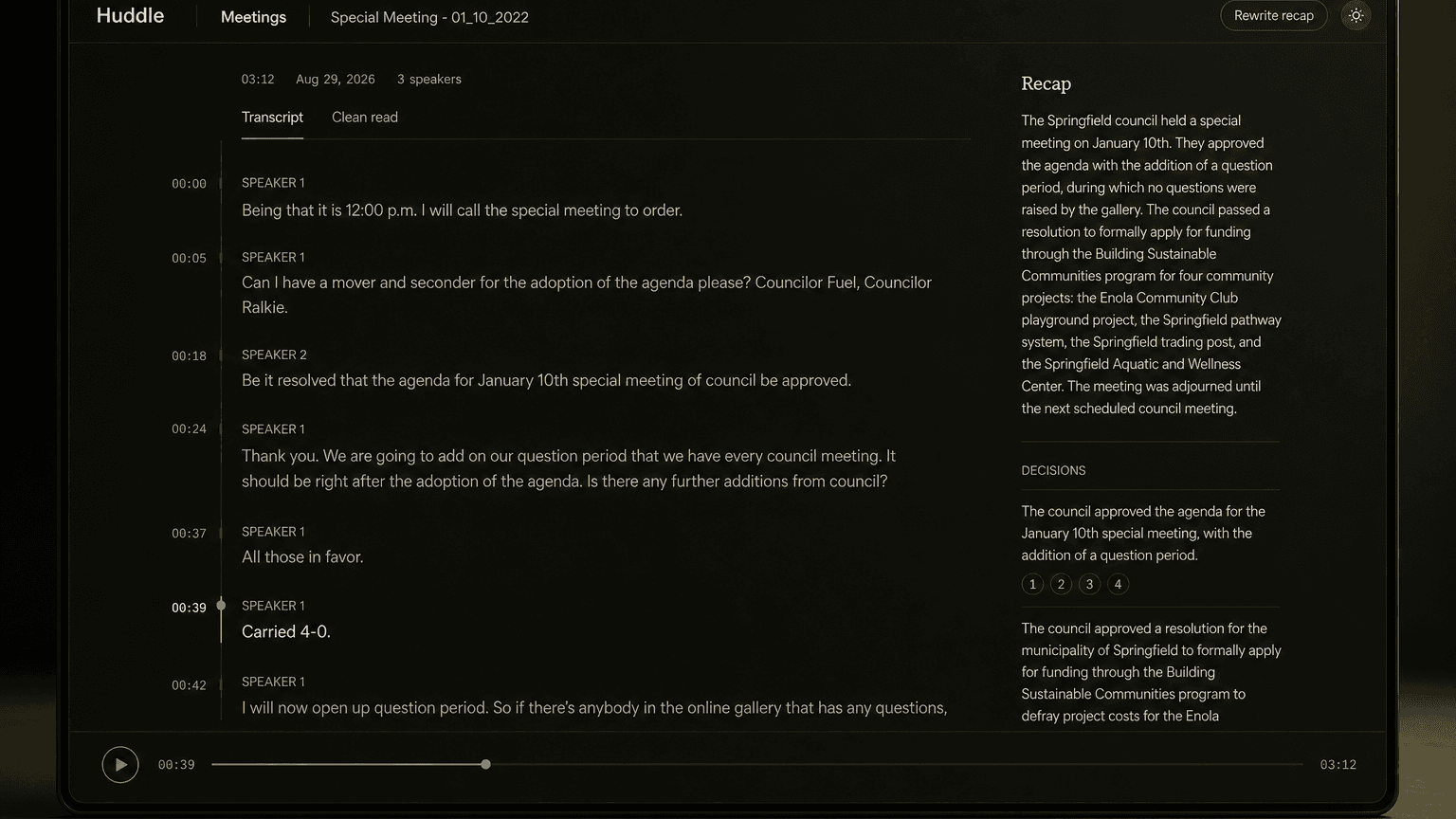
Meetings don't fail because nobody talked. They fail because the notes are unusable.
I've sat through plenty of meetings where someone took notes, sent a summary two days later, and half the action items were vague or missing context. The people who needed to see it didn't trust it enough to act on it. That's the gap I wanted to close with Huddle: throw in a messy meeting recording, get a speaker-labeled transcript and a recap you'd actually send — decisions, action items, open questions — with every claim linked back to the moment in the audio where it was said.
Google released Gemini 3.5 Transcribe on August 26th. I started building on the 27th. By the 29th, I had a working copilot and a clearer picture of what the API will and won't do. The interesting part wasn't the happy path. It was the three things the model can't do at the same time, and how those constraints shaped what I shipped.
What I built
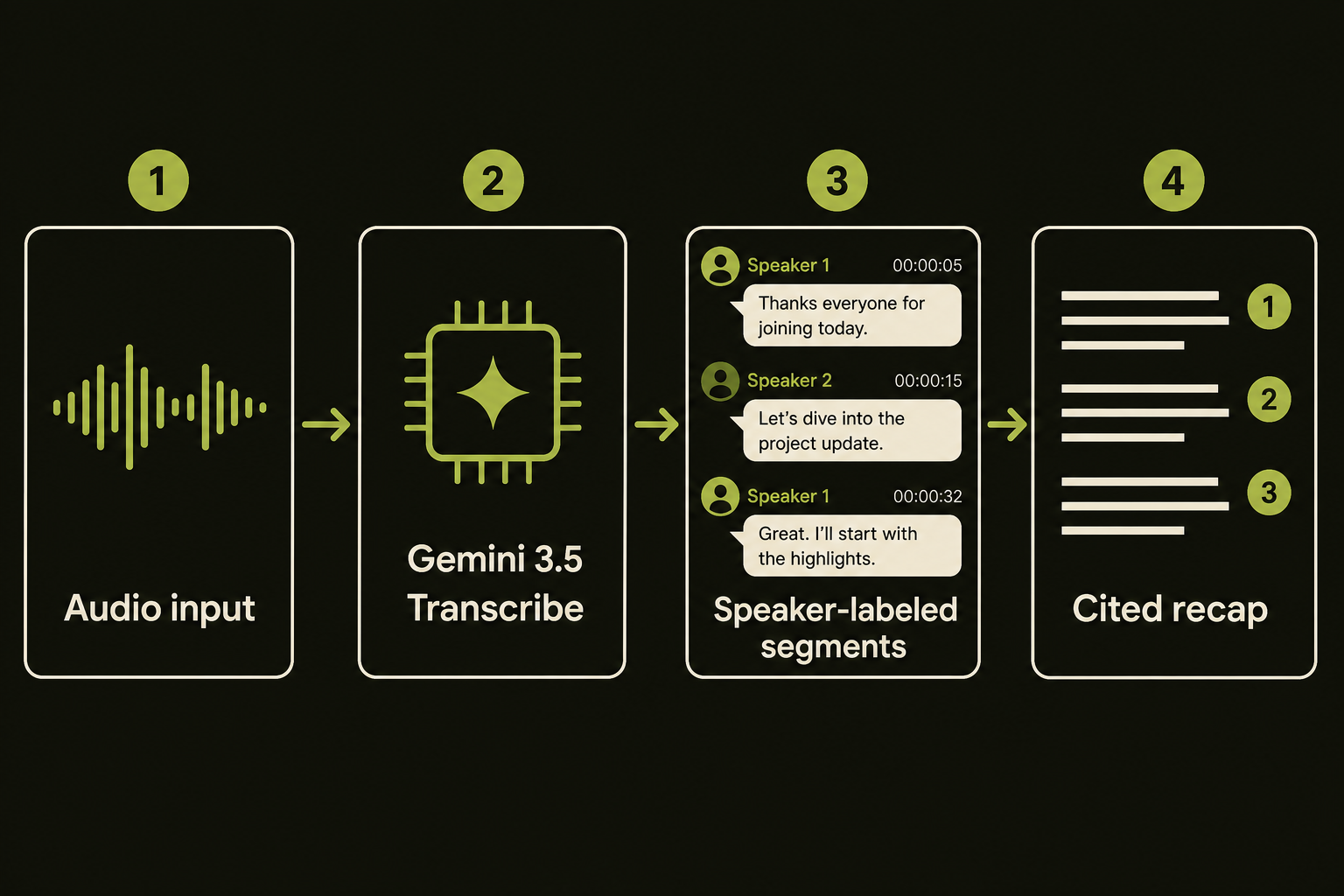
Huddle is a FastAPI backend with a Vite/React/TypeScript frontend. Upload a meeting recording. The backend calls Gemini 3.5 Transcribe with speaker diarization and word-level timestamps turned on. You get a speaker-labeled transcript where you can rename "Speaker 1" to the person's actual name. Then it runs a second pass that generates a structured recap: summary, decisions, action items (with owner and due date when stated), and open questions.
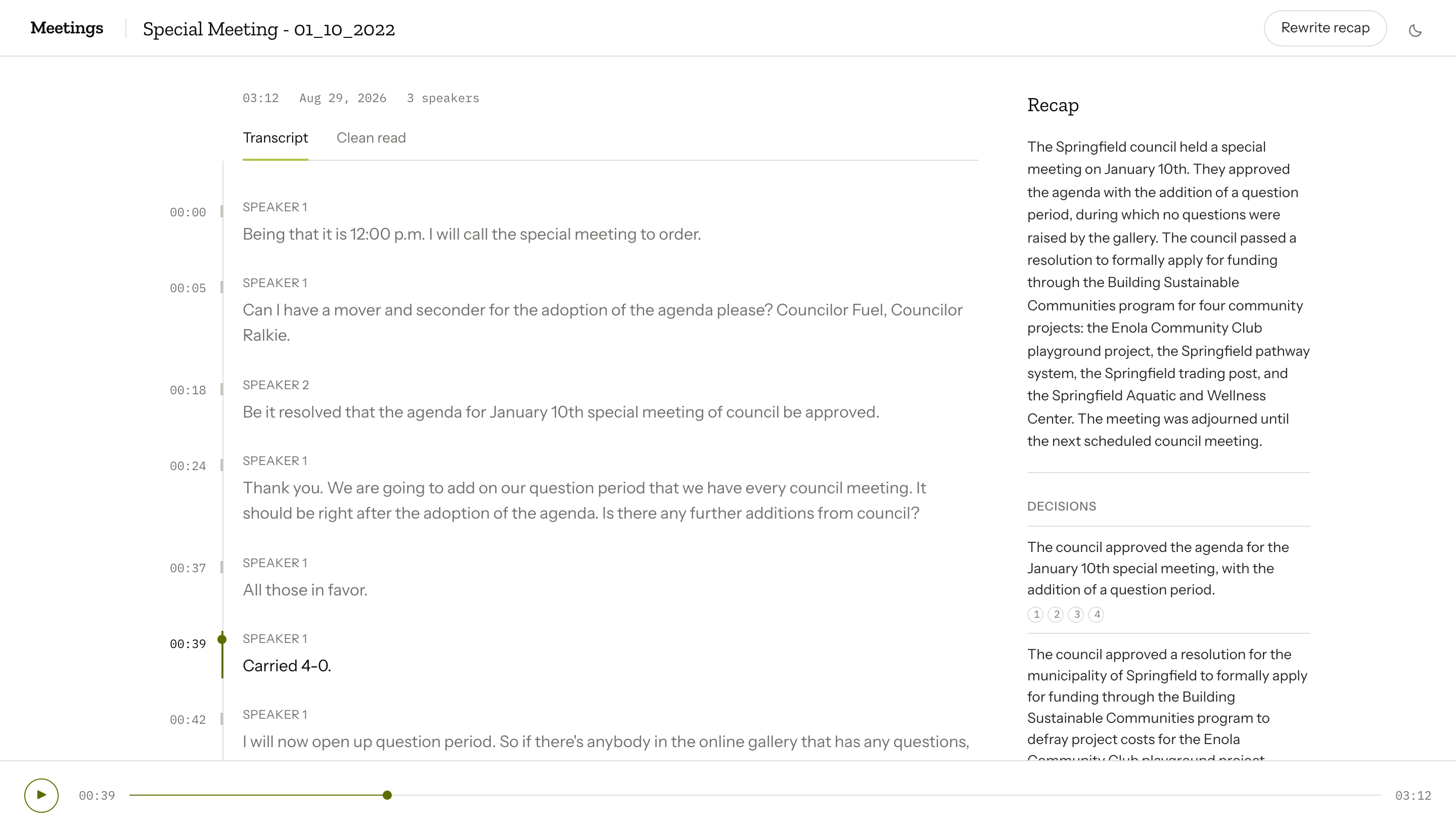
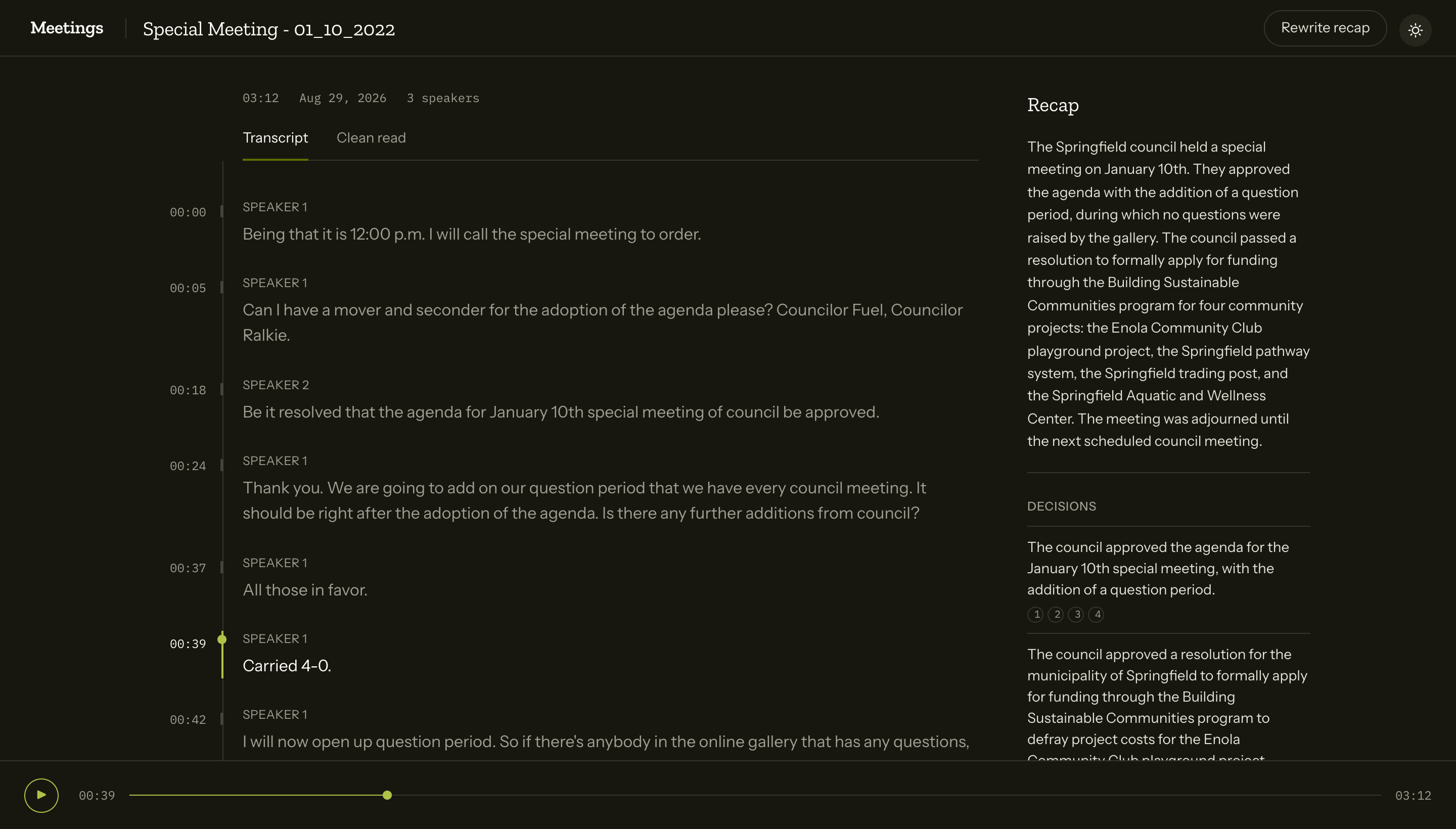
Every item in that recap includes citation.segment_ids — the specific transcript segments where that claim came from. Click a citation and it jumps you back to that moment in the audio. If someone questions whether a decision was actually made, you can play them the 15 seconds where it happened.
The stack: Python 3.12, FastAPI, SQLite via aiosqlite, uv for dependencies. OpenAPI-generated client types on the frontend. The Google protocol code lives entirely in api/app/transcribe/. The frontend proxies /api to :8000. 39 tests. Commit d728280 shipped the batch transcript and cited recap as of August 29th.
The three traps
This is where it got interesting. Gemini 3.5 Transcribe is three days old. The documentation is sparse. I probed the API with a live key and hit three constraints that weren't documented clearly — or at all.
1. Custom vocabulary is incompatible with diarization and word timestamps
The API offers a custom vocabulary feature: you pass a list of domain-specific terms (product names, acronyms, jargon) and it prioritizes those in transcription. Useful if your meetings are full of "Kubernetes" and "PostgreSQL" and you don't want them mangled.
Except custom vocabulary doesn't work if you also want speaker diarization and word-level timestamps. I toggled all three on in my first test. Got a 400 error. No explanation in the docs. I tried combinations. Vocab + diarization: fails. Vocab + timestamps: fails. Vocab alone: works. Diarization + timestamps: works.
The constraint is undocumented. I confirmed it with direct API calls. If you want structure — who said what, and when — you give up custom vocabulary. If you want vocabulary, you give up structure.
For Huddle, structure wins. Speaker labels and citations are more valuable than perfect acronym spelling. You can still post-process the transcript with a vocabulary substitution pass if you need to, but you're doing it client-side after the fact.
2. The cleaned pass and the structured pass don't align
Gemini 3.5 Transcribe offers two output modes: verbatim (what was said, including disfluencies) and smart (cleaned prose). I wanted both: give users a verbatim view with speaker labels and timestamps, and a cleaned view they could export for readability.
I ran both passes on the same audio file. They didn't align. The verbatim pass with diarization returned timestamped segments: "Speaker 1 at 0:04 said X." The smart pass returned one cleaned text blob for the entire meeting with no speaker labels, no segments, no timestamps.
That's not a bug. They're separate API calls that process the audio differently. The cleaned pass doesn't return structure. It returns prose. When I tested on a sample with "at four" versus "at 4:00", the two passes gave me different token sequences. There's no way to toggle between cleaned and verbatim at the segment level. You get one structured pass (verbatim + diarization + timestamps) or one cleaned pass (prose, no structure).
In Huddle, the structured pass is the source of truth. Recap citations resolve against those segments. The cleaned text lives in a separate "Clean read" tab. It's useful for skimming, but it's not connected to the speaker timeline or the citations.
3. Live captions have no diarization
The API exposes a live transcription model: gemini-3.5-transcribe-live. I tried it. It works for streaming captions, but it doesn't do speaker diarization or word timestamps. The live model caps at 10 minutes of continuous streaming. If you want speaker labels for a live meeting, you have to record it, then run the recording through the batch path afterward.
I didn't wire live captions into Huddle. The batch path does what I needed: speaker labels, timestamps, citations. Live captions without "who said what" aren't useful for the recap workflow. Maybe useful for live subtitles in a webinar, but not for meeting notes.
What I left unbuilt
The batch API with diarization and timestamps caps at 30 minutes of audio per request. Longer meetings require chunking and stitching speaker labels across boundaries. I didn't build that. Most of the meetings I've recorded are under 30 minutes. If you're regularly running 90-minute standups, you'd need chunking logic — and speaker identity across chunks is not trivial.
I also didn't deploy a public upload form. Meeting audio is other people's voices. I'm not exposing a Gemini API key to the internet where anyone can upload anything. The showcase is this case study, the repo, and optional sample clips — not a live demo where you paste your key or I absorb your costs.
Cost: Google's list price is roughly $0.005 per minute of audio. A 30-minute meeting with two passes (structured + recap) runs about $0.30 on the batch API. That's probe-consistent but not a production billing SLA. If you're running this at scale, test your own workload.
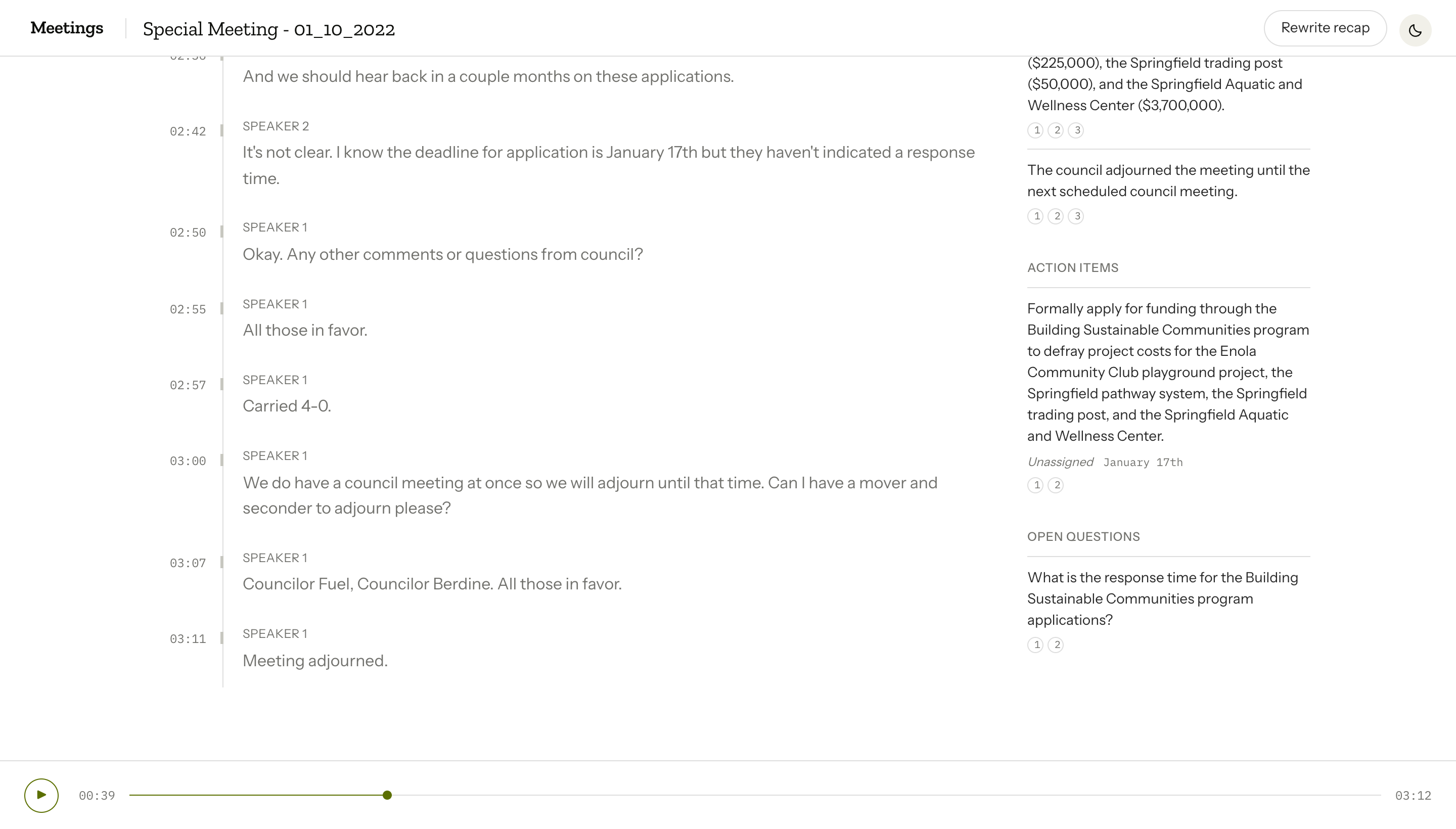
The recap is structured JSON: summary, decisions[], action_items[] (with nullable owner and due date), and open_questions[]. Due dates only populate when explicitly stated in the transcript — never inferred. Each item carries citation.segment_ids that jump back to the relevant audio. Users can rename speakers from "Speaker 1" to actual names. Diarization supports up to 8 speakers; the docs note "3+ experimental" and warn that quality degrades above 3.
What I learned
I built Huddle in a weekend because I wanted meeting notes I could trust. The recap links to the source. If someone asks, "Did we really decide that?" you can play them the clip. That's the part that matters.
The API constraints shaped the product. Custom vocabulary doesn't work with structure, so structure won. Cleaned text doesn't align with segments, so citations resolve against the verbatim pass. Live captions don't have speaker labels, so I stuck with batch.
This was a Friday AI-build challenge on a three-day-old model. The interesting part was probing what the API actually does when you combine features it theoretically supports. The docs said yes. The 400 errors said no. I adjusted.
The repo is github.com/bilaltahseen/huddle. If you're working on meeting intelligence, transcription workflows, or anything adjacent, reach out: bilaltehseen@gmail.com.
Building something with AI?
I help teams ship production AI agents, retrieval systems, and document intelligence. Let's talk about yours.