Conversational AI for Customer Service Isn't a Chatbot Upgrade
· Bilal Tahseen
I've seen the same cycle a dozen times. A team demos an AI chatbot for customer service. It answers a cherry-picked FAQ, maybe handles a return lookup, and everyone's impressed. They buy it. Two months later, production falls apart. The agent can't find order statuses in the real CRM. It invents refund policies. It fails on voice. Users escalate to humans immediately.
The problem isn't the model. It's the architecture. Teams shop for conversational AI for customer service and buy a chatbot with an API wrapper. Those are not the same thing.
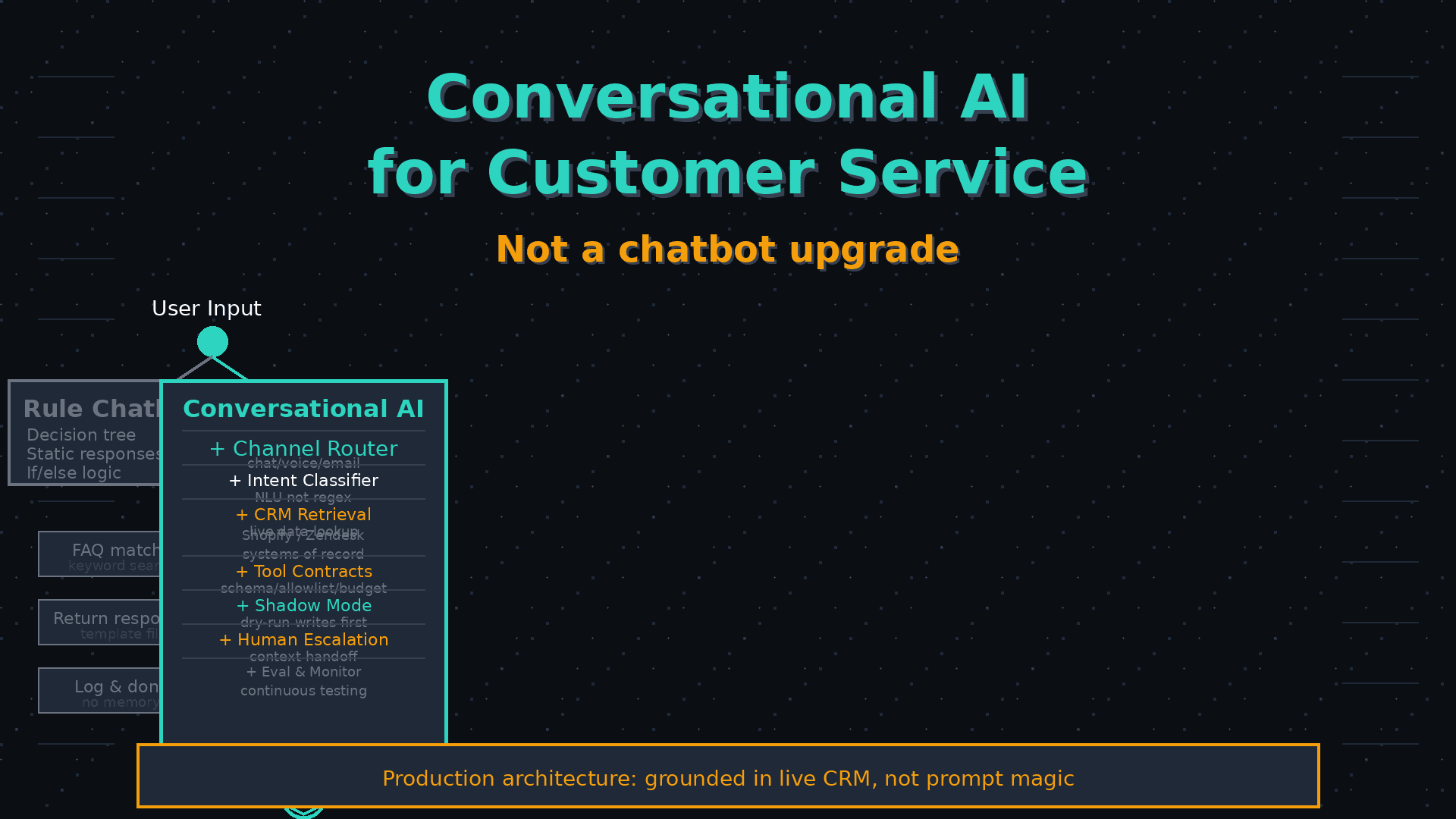
A chatbot follows decision trees with canned responses. Conversational AI grounds every reply in live systems, routes tools through contracts, and escalates with full context when it can't handle the request. The difference matters when the customer is angry about a charge, when you're fielding 10,000 voice calls a day, or when the wrong response costs money.
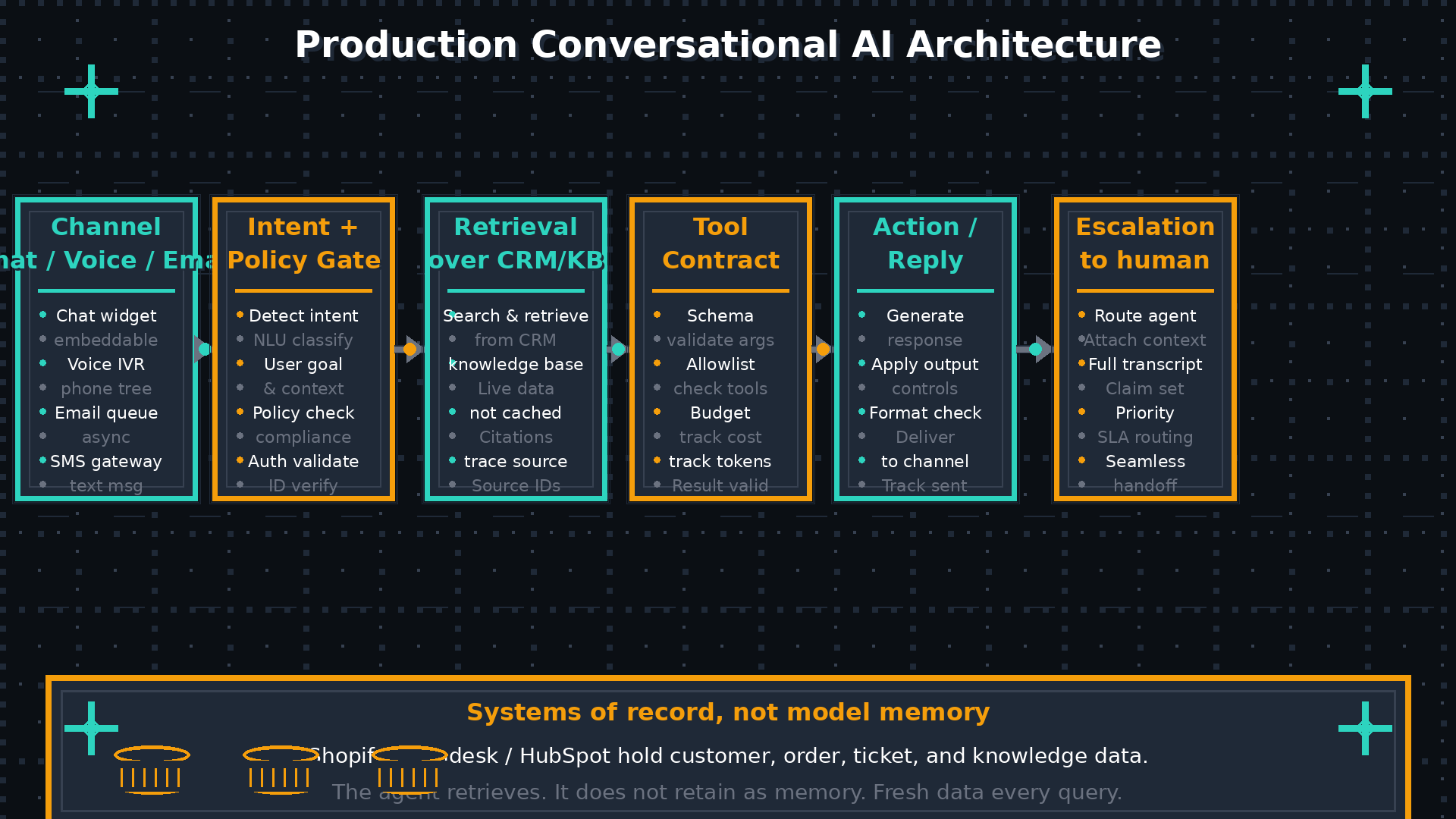
Here's the architecture I actually ship when production conversational AI for customer service means more than a widget on a landing page.
Conversational AI vs chatbot: what you're actually buying
When people search conversational AI for customer service, they're trying to solve a business problem. "Automate order status lookups." "Reduce call center hold times." "Let customers reschedule appointments without waiting for an agent." Those are outcome queries. The software category matters less than whether it works.
The confusion starts when vendors demo chatbots and call them conversational AI. Here's the split.
A chatbot is a rule engine. User says X, bot replies Y. You map intents to responses. If the user asks "where's my order," the bot triggers a lookup script, maybe hits an API, returns a templated message. Works great for FAQs, shipping status, store hours. Scales cheaply. Predictable. No model hallucination risk because there's no model, just if/else trees and regex.
Conversational AI is an agent with tools. It doesn't match keywords. It interprets natural language requests, retrieves context from live data sources (your CRM, knowledge base, order history), picks the right tool to execute, and generates a response grounded in that retrieval. It can handle multi-turn conversations where the user changes their mind, asks follow-ups, or pivots to a different request mid-thread. It doesn't break when someone phrases a question in a way you didn't script.
The trade-off: chatbots are deterministic and cheap. Conversational AI is flexible and expensive. Chatbots fail gracefully when they hit an unknown intent. Conversational AI can hallucinate or call the wrong tool if you don't wrap it in contracts.
If your use case is "answer 50 common questions," build a chatbot. If it's "let users modify their subscription, look up invoices, and change delivery addresses in one conversation," you need conversational AI with CRM integration and tool contracts.
The architecture I'm describing here is for the second case. If you're in the first case, save your money and ship a decision tree. It'll be faster, cheaper, and you won't need half of what's below.
Channel split: text, voice, and the handoff problem
The first fork in production conversational AI for customer service is the channel. Chat, voice, and email route through the same intent layer, but execution differs.
Chat and email are asynchronous. The agent has time to retrieve from the CRM, validate tool arguments, run a schema check, and format a response. Latency budget is 2-5 seconds. Users tolerate that. You can log every turn, build an eval set, and replay failures offline.
Voice is synchronous. The user is on the phone. Latency budget is under 1 second or they think the line dropped. You can't do heavy retrieval in-band. Pre-fetch likely context (customer record, recent orders, open tickets) when the call connects. Keep the LLM calls fast, use a specialized voice model if you have one, and don't try to run a 30-second CRM search while the user is waiting.
High-volume voice is where conversational AI for customer service gets expensive. If you're routing 10,000+ calls a day through an LLM-based agent, the cost adds up fast. That's when you front-load a rule-based IVR for simple intents (balance inquiry, payment confirmation, appointment reminder) and only escalate to the conversational AI agent when the IVR can't handle it. Then, when the conversational AI agent hits something irreversible or ambiguous, you escalate to a human with the full transcript and claim context.
The mistake I see teams make: they build a great chat agent, then try to bolt it onto voice without changing the latency model or the retrieval strategy. It fails in production because users hang up before the agent finishes thinking. Voice and chat share the same intent classifier and the same CRM tools, but the execution path has to split.
Systems of record are not model memory
This is the part that breaks most demos. The agent "remembers" the customer's name because the vendor hard-coded it in the test environment. In production, your conversational AI agent needs to pull live data from Shopify, Zendesk, HubSpot, or whatever CRM you actually use.
The LLM doesn't store customer data. It retrieves it. Every time the agent needs an order status, a ticket history, or an account balance, it calls a retrieval tool that queries the system of record and returns structured data. The agent sees that data in context, uses it to generate a response, and discards it after the turn. If the customer asks the same question five minutes later, the agent retrieves again.
Why does this matter? Because CRM data changes. Orders ship. Tickets close. Payments clear. If your conversational AI agent is working off a static snapshot or cached state, it'll give stale answers. The architecture has to treat the CRM as the source of truth and retrieve fresh every time.
Here's the retrieval flow I use:
- User message comes in. Intent classifier determines what the user wants (order status, refund, reschedule, etc.).
- Policy gate checks: is this user authenticated? Is this action allowed? Does this intent require escalation (fraud, abuse, legal)?
- Retrieval tool queries the CRM or knowledge base with the user's identifier (email, phone, account ID). Returns structured data: order list, ticket history, knowledge base articles, whatever's relevant.
- Agent receives retrieval results as tool output. It doesn't get raw database rows. It gets a cleaned, schema-validated response with only the fields it needs.
- Agent drafts a reply grounded in that data. The reply includes citations (order number, ticket ID, article link) so the user can verify.
If the retrieval fails (user not found, CRM timeout, malformed query), the agent doesn't invent data. It returns a structured error and escalates to a human if the intent is high-priority.
The systems of record note in the architecture diagram isn't flavor text. It's the difference between an agent that works in a demo and an agent that works when your CRM has 500K customer records and changes every second.
Tool contracts: schema, allowlist, budget
I wrote a whole post on tool contracts. The short version: your conversational AI agent can't call tools directly. Every tool invocation goes through a contract layer that validates arguments, checks an allowlist, enforces a call budget, and rejects anything that doesn't pass.
For customer service specifically, here's what that looks like.
Schema validation. If the agent tries to look up an order, the lookup_order tool requires a well-formed order ID or email. If the agent hallucinates a field or passes a string where an integer is expected, the contract rejects the call. The agent gets a typed error and can retry with corrected arguments if it's within budget.
Allowlist. The agent can call lookup_order, lookup_ticket, search_kb, and escalate_to_human. It cannot call refund_order or cancel_subscription without going through shadow mode first (I covered that in my shadow mode post). The allowlist is explicit. If a tool isn't on the list, the agent can't invoke it, even if the function exists in the codebase.
Budget. Each session gets a call budget (e.g., 20 tool calls) and a token budget (e.g., 50K tokens). If the agent loops or tries to brute-force a solution by calling the same tool 50 times with slight variations, the contract kills the session. This prevents runaway costs and infinite loops.
Result validation. When the tool returns data, the contract checks the response against an expected schema. If the CRM returns malformed JSON or an error code the agent isn't equipped to handle, the contract surfaces a clean error instead of passing garbage to the agent.
In production conversational AI for customer service, tool contracts are not optional. Without them, your agent will eventually call a tool with bad arguments, blow through your API quota, or return invented data to a user. The contract layer is infrastructure, not prompt engineering.
The decision tree: when a chatbot is enough
Not every customer service problem needs conversational AI. Here's how I decide.
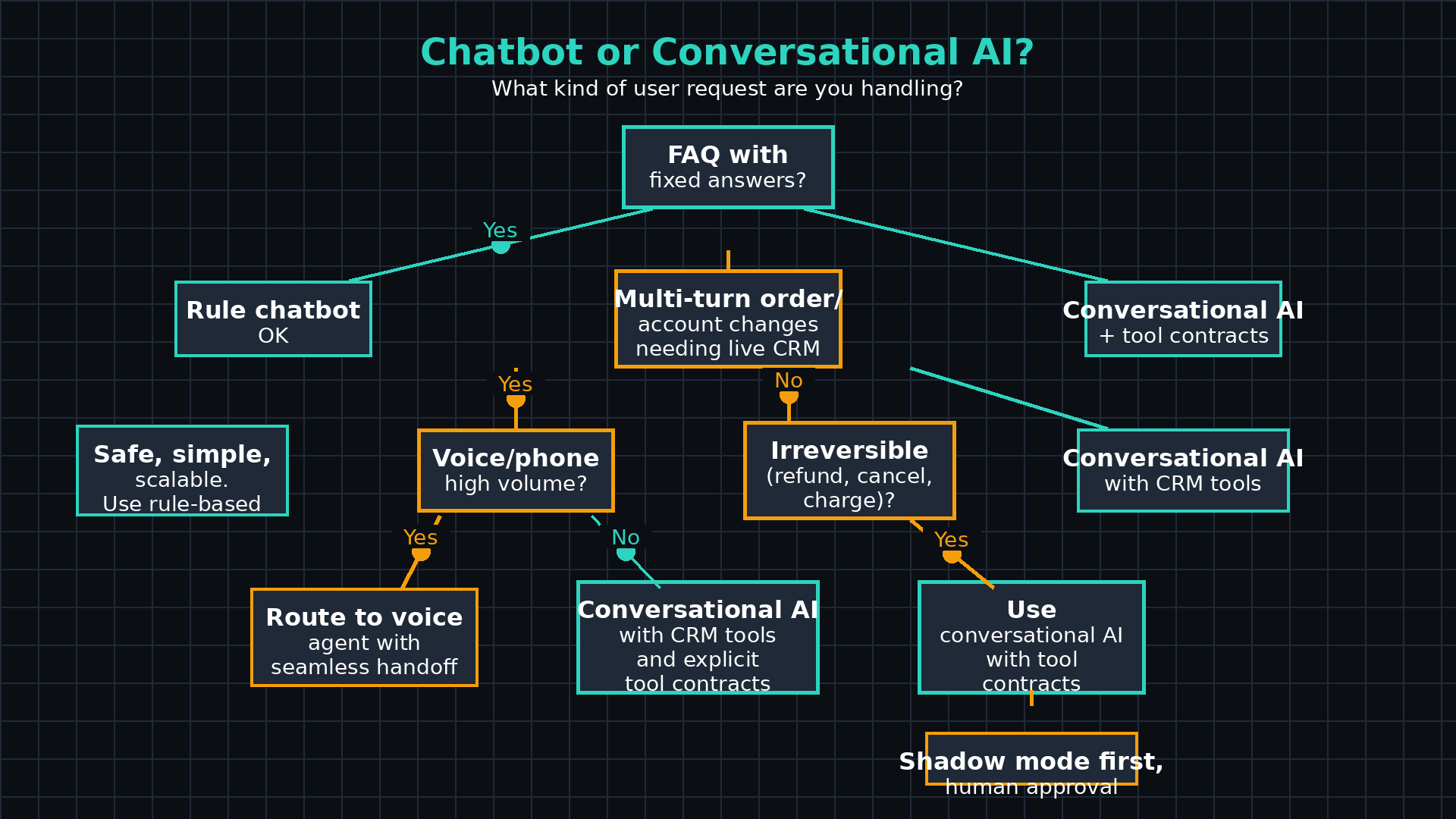
FAQ with fixed answers. User asks "what's your return policy," "where do you ship," "how do I reset my password." These are static. Build a rule-based chatbot. It's faster, cheaper, and you don't need an LLM. Pattern-match the intent, return a canned response. Done.
Multi-turn order or account changes needing live CRM. User says "I want to change my delivery address for order 5823 and also check if my refund from last month went through." That's two intents, both requiring CRM lookups, in one message. A rule bot chokes. Conversational AI with tool contracts can parse the request, retrieve both pieces of data, and respond in one turn.
Voice with high volume. If you're fielding thousands of calls a day, front-load a rule-based IVR for simple intents. Escalate to conversational AI for complex requests. Then escalate to a human when the conversational AI agent can't resolve it. The handoff has to be seamless: the human gets the transcript, the user's context, and the claim set (what the agent tried, what failed). Don't make the user repeat themselves.
Irreversible actions. Refunds, cancellations, charges, anything you can't undo. Don't let the conversational AI agent execute these on the first try. Use shadow mode. The agent computes what it would do, logs the intent, and gates on human approval. Only after a human reviews the diff does the live executor run. I covered this in my shadow mode post.
If your use case is in the first bucket, you don't need what I'm describing here. Ship a rule bot, save the engineering effort, and call it a day.
If you're in buckets two through four, keep reading.
What I actually implement for clients
This isn't a tutorial. It's the structure I've built multiple times for teams shipping production conversational AI for customer service. Your stack will differ. The concepts stay the same.
Channel router. Receives the incoming message (chat, voice, email). Extracts metadata: user identifier, session ID, timestamp, channel type. Routes to the intent classifier.
Intent classifier. Takes the user message and classifies intent: order_status, refund_request, reschedule_appointment, general_question, escalate. Can be a fine-tuned classifier, a few-shot LLM prompt, or a hybrid. Returns the intent and confidence score.
Policy gate. Checks: is this user authenticated? Is this intent allowed for this user? Does this intent require escalation (fraud, abuse, legal inquiry)? If the gate rejects, the router escalates immediately. No retrieval, no tool calls.
CRM retrieval. If the intent requires data (order status, ticket history), the agent calls a retrieval tool. The tool queries the CRM with the user's identifier, returns structured data. The agent sees the data as tool output, not as part of its memory.
Tool contract layer. Wraps every tool invocation. Schema validation, allowlist check, budget enforcement, result validation. Rejects bad calls before they hit the CRM or external APIs. Logs everything for audit.
Action executor. The agent drafts a response or executes a tool (if allowed). For reads (lookup order, search KB), execute immediately. For writes (update address, reschedule), route through shadow mode if the write is reversible, or gate on human approval if it's not.
Escalation path. If the agent can't resolve the request (ambiguous intent, retrieval failure, tool error), it escalates to a human. The escalation payload includes: user identifier, session transcript, intent classification, tool calls attempted, error logs, and priority score. The human agent picks up with full context.
Eval set. A dataset of real support queries (not cherry-picked demos). I build this from the first 500-1000 production sessions. It covers edge cases: ambiguous phrasing, multi-intent messages, CRM lookup failures, escalation triggers. I run the eval set after every architecture change to catch regressions.
This is infrastructure, not a weekend hack. If you're scoping this work and someone tells you it's just "plug in an LLM and call the CRM API," they're wrong. Production conversational AI for customer service is a system: channel routing, retrieval grounding, tool contracts, shadow mode for writes, and escalation with context. The LLM is one component. The architecture is what makes it work at scale.
When I tell teams to wait
If your support volume is under 500 tickets a month and most of them are unique, one-off issues that require human judgment, conversational AI won't help. You're paying LLM inference costs and engineering time to automate a problem that's too small or too variable to justify the infrastructure.
If your CRM is a mess (data quality issues, missing fields, no API, or the API is rate-limited to 10 requests per minute), fix that first. Conversational AI grounded in bad data gives bad answers. Garbage in, garbage out.
If you don't have buy-in from the support team, don't ship it. The escalation path only works if the human agents trust the handoff and have the tools to pick up where the AI left off. If they're fighting the system or manually redoing what the agent tried, you've made their job harder, not easier.
And if you're in the "FAQ with fixed answers" bucket, just ship a rule bot. Conversational AI for customer service is not a status symbol. It's infrastructure for a specific kind of problem: multi-turn, CRM-grounded, high-volume support queries that can't be scripted in advance.
Close
Buyers searching conversational AI for customer service are trying to automate complex, multi-turn support workflows. What they usually get is a chatbot with an LLM bolted on. That works for demos. It doesn't work in production when the CRM has half a million records, when users are on the phone and can't wait five seconds for a response, or when a wrong answer costs money.
The architecture I've described here is what I ship when conversational AI for customer service means more than a landing page widget. Channel routing, CRM retrieval with live data, tool contracts that enforce schemas and budgets, shadow mode for writes, and escalation paths that hand off with full context.
It's not simple. It's not fast. It's what works when production matters.
I work with teams scoping conversational AI for customer service who need production architecture, not another demo. If that's you, reach out: bilaltehseen@gmail.com or check out my hire page.
Building something with AI?
I help teams ship production AI agents, retrieval systems, and document intelligence. Let's talk about yours.